BlueAgentBluemira, hosted — with the physics talking back.
Drag the major radius and the plasma follows you in 3D. Type a new aspect ratio and PROCESS re-sizes the whole machine. Ask why the blanket just got thicker and a colleague who knows the physics tells you — or, on the research path, argues. Bluemira in the browser, for a course or a research group.
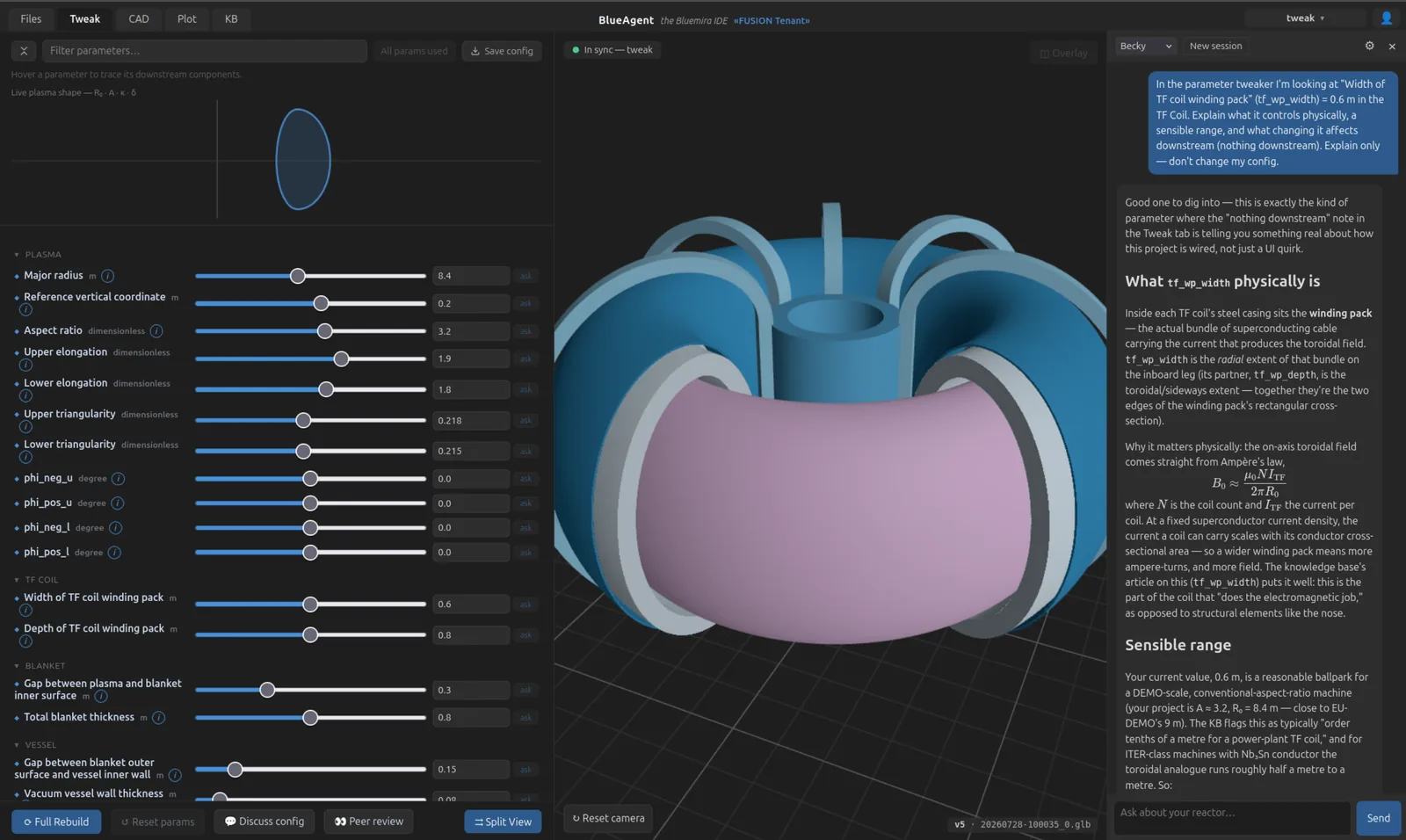
What answers back
- The Tweaker
- Every parameter of your reactor as a slider, grouped by component. Drag R₀, κ or δ and the plasma cross-section redraws under your hand; open the split view and the coils, blanket and vessel morph with it in 3D, the TF coil sized the way Bluemira’s own optimiser sizes it. Hover a parameter and everything downstream lights up amber — the dependency graph of your machine, drawn on the machine.
- PROCESS, in the loop
- The systems code lives inside the Tweak tab, not in a terminal beside it. Read a run under Bluemira’s own names and see which limits shaped it — EU-DEMO sits on 12 of its 24, and that list is the design. Type an aspect ratio of 3.0 instead of 2.7 and PROCESS re-sizes the plant in a minute or two. Scan a range and the feasibility boundary is drawn where it flips. Take the solved point back to the sliders and rebuild.
- A colleague who knows the physics
- Becky teaches while you build. Hartmut argues trade-offs with numbers. Sabine reviews and never builds. All three read your actual code and your actual run, and a file they write lands on disk only when you accept the diff. Every slider carries an ask button that hands the agent that parameter, with its value and what hangs off it.
- Consequences neither document carries
- Some numbers exist only once the geometry does. The TF field ripple takes the coil from your config and the machine from the run, computes it with Bluemira’s own Biot-Savart solver, names every input and where it came from, and says what would meet the limit — 26 coils would. The inboard build is stacked at the midplane, gap by gap, and either closes or does not.
- A knowledge base that grows with the project
- Some three hundred articles on the physics and the engineering, a glossary entry for every parameter, and the notes the agent writes as you go — about your reactor, not a textbook one. At the end there is a button that binds it all into one textbook: the one you wrote by building.
- Files that open into Bluemira
- Your code, with jump-to-definition that follows a symbol into the library’s own source and back out again; git without leaving the tab; and a read-only view of how Bluemira does it under the hood, for the day you want to know.
For a course
Thirty students, one tokamak each. The first one they build teaches what a divertor is for; comparing the last one with EU-DEMO teaches why a power plant is the size it is. Becky answers at the moment the question occurs, the sliders make the physics tactile, and a semester licence ends by itself. Everyone works in the browser, on whatever laptop they own.
For a research group
One installation for the group, one Bluemira version, results anyone can reproduce. Hartmut has read the build — the code, not a summary of it — and points at the 0.2 m between the solenoid and the TF leg before the winding pack does. PROCESS runs beside the geometry, so a design point is solved rather than estimated, and a scan says how far it holds.
Bluemira itself is open source and stays free. What you buy here is the machine that has it running for everyone, current, with the systems code beside it — and the colleague.
The build
- Bluemira IDE The workbench without the agent: the Tweaker with its live plasma, CAD, plots, files with git, the knowledge base, and PROCESS runs to read. No inference and no credit — the tier for a course that wants the tool and not the tutor.
- BlueAgent EDU Adds Becky. She explains the machine while you build it, reads what is on your screen, and writes the knowledge base as you go — where a student starts.
- BlueAgent SCI Adds Hartmut and Sabine, and the systems code to solve with them. The agent stops teaching and starts arguing: a peer who pushes parameters to their limits, and a reviewer a design has to survive.
- PROCESS solving (systems code) Solving on an IDE or EDU seat: re-solve, scan, adopt the point into the sliders. Reading a run is free on every plan; this is for running your own. Beside the path you chose, not above it.
Seats in one group can sit on different shells. You move somebody from EDU to SCI when the work moves, not at renewal.
You cannot be surprised by a bill. Inference runs on prepaid credit. When the credit is gone the agent stops and asks — it does not keep spending. No overage, no invoice you did not authorise, and every turn on the statement with the tokens behind it.
For institutes
Running BlueAgent for a whole institute is a different arrangement: your own deployment, compute sized to the work, and an invoice in your own name against a purchase order. That is agreed with a person, not through a checkout.
Where it runs
- Your own tenant
- One tenant per group. Files, threads and designs stay inside it — no other group's work touches yours.
- Self-hosted, in the EU
- Our machines, our storage — Germany and France. No CDN, no analytics, no fonts fetched from anywhere: this page loads nothing but itself.
- What does leave
- The agent cannot answer without reading: your message and the project context it needs go to Anthropic in the USA. That transfer runs on the EU Standard Contractual Clauses, and under Anthropic’s API terms the data is not used to train models. Nothing else leaves your tenant.
- Your own key, if you would rather
- Bring an Anthropic key and the inference is billed to you directly. Then you pay us for the platform and nothing else.
Groups are building on it now — in seminar rooms and on DEMO-class designs. An account costs nothing and commits you to nothing. Open the spherical tokamak, drag a slider, and go light a small star.